
Navigate: System Settings →Space → Seat→ Seat number settings.
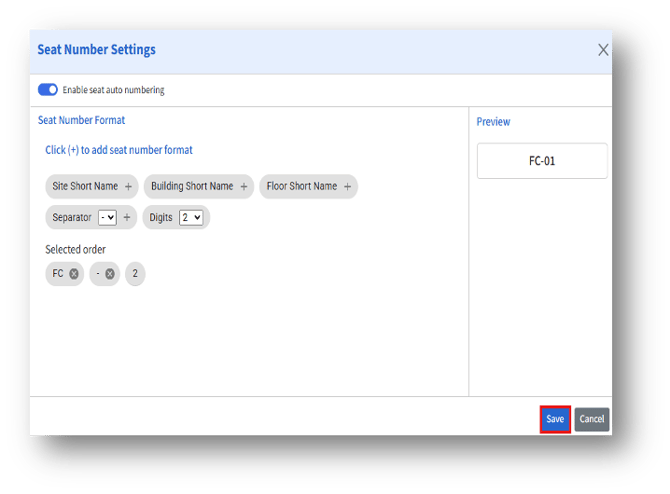
- Enable Seat Auto Numbering – When this toggle is enabled, the system automatically assigns seat numbers according to the predefined numbering format set on this configuration page.
Impact:
a. If checked, new seats added will automatically receive a seat number as per the defined format.
b. If unchecked, admins must manually enter seat numbers when creating or editing seat details.
2. Seat Number Format
a. This section allows admins to define the structure and components of the seat numbering format.
b. Multiple elements can be added by clicking the (+) button to create a customized seat numbering pattern using identifiers like Site Short Name, Building Short Name, Floor Short Name, Separators, and Digit format.
3. Selected Order – Displays the order of elements added, helping you visualize how the final seat number will be structured. Click the Cancel (x) button to remove any unwanted format element from the sequence.
4. Preview – Shows a live preview of the seat numbering format based on the elements added.
After adding the details, click the Save button to apply the configuration.