
Navigate: System Settings →Space → Move→ Notification settings.
The “Notification Settings” page allows admins to configure notification preferences for different admin roles in the system.
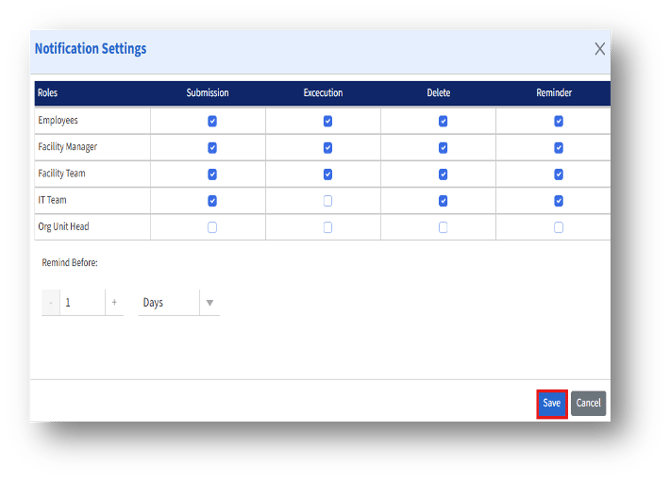
Details given below:
|
Notification type |
Description |
Impact when enabled |
|
Submission |
Sent when a request, form, or action is submitted. |
The selected role receives a notification upon submission. |
|
Execution |
Sent when an action or workflow step is executed. |
The role is notified when the task or process is carried out. |
|
Delete |
Sent when an item or request is deleted.
|
The role is informed about deletions relevant to their scope. |
|
Reminder |
Sent as a reminder before scheduled executions or deadlines. |
The role receives timely reminder notifications.
|
Reminder Configuration
1. Remind Before – Allows admins to set the number of days before an event when reminder notifications should be sent.
2. Configuration Steps:-
- Specify the number of days/hours before the event to trigger a reminder.
- Choose the time unit (default is Days).
- The system will automatically send reminder notifications to roles that have the Reminder option enabled.