
Navigate: System Settings →Space → Move→ Business Rules.
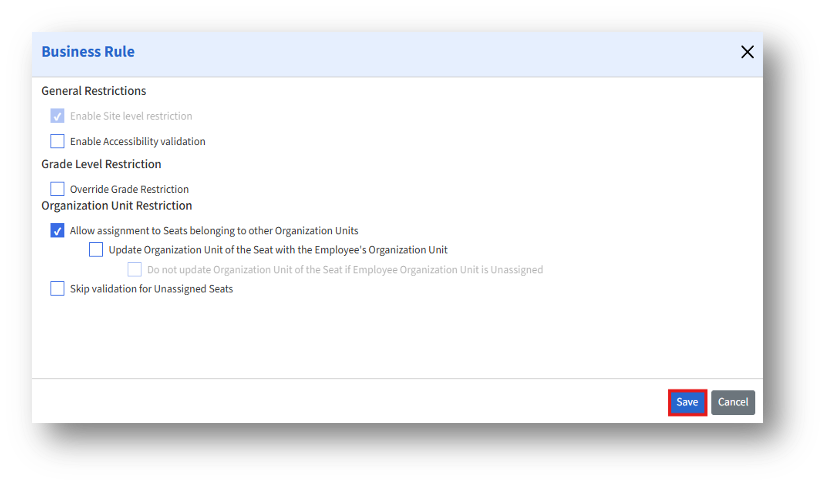
The Business Rule page enables admins to define system-level restrictions and validation behaviors that govern employee-to-seat assignments and organizational relationships within the application.
General Restrictions:
|
Setting |
Purpose/ Effect when enabled |
|
Enable Site Level Restriction |
When enabled, this restriction ensures that employees can only be assigned to seats within their assigned Site. |
|
Enable Accessibility Validation |
Allows adding employees directly to a move request. |
Grade Level Restriction:
|
Setting |
Purpose/ Effect when enabled |
|
Override Grade Restriction |
Allows admins to bypass or override grade-based seat assignment restrictions when necessary. |
|
Enable Accessibility Validation |
Allows direct addition of employees to a move request |
Organization Unit Restriction:
|
Setting |
Purpose/ Effect when enabled |
|
Allow assignment to Seats belonging to other Organization Units |
Enables employees to be assigned to seats in a different Organization Unit than their own. |
|
Update Organization Unit of the Seat with the Employee's Organization Unit |
When enabled, the system automatically updates the Seat’s Organization Unit to match the assigned employee’s Organization Unit. |
|
Do not update Organization Unit of the Seat if Employee Organization Unit is Unassigned |
This restriction can only be enabled when the “Update Organization Unit of the Seat with the Employee's Organization Unit” checkbox is active. This restriction prevents automatic Organization Unit updates if the employee’s Organization Unit is unassigned or undefined. |
|
Skip validation for Unassigned Seats |
When enabled, the system bypasses validation checks for unassigned seats. |