
1. To add a Workplace or Site, select the customer’s name in the left panel, then click the “+Site/+Workplace” button.
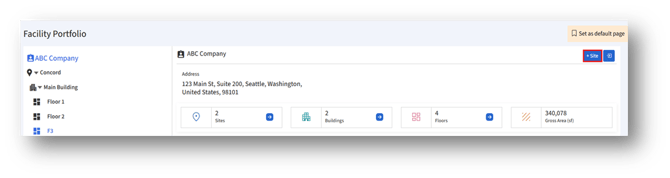
2. Clicking the “+Site/+Workplace” button opens the “Add Site/Workplace” page.
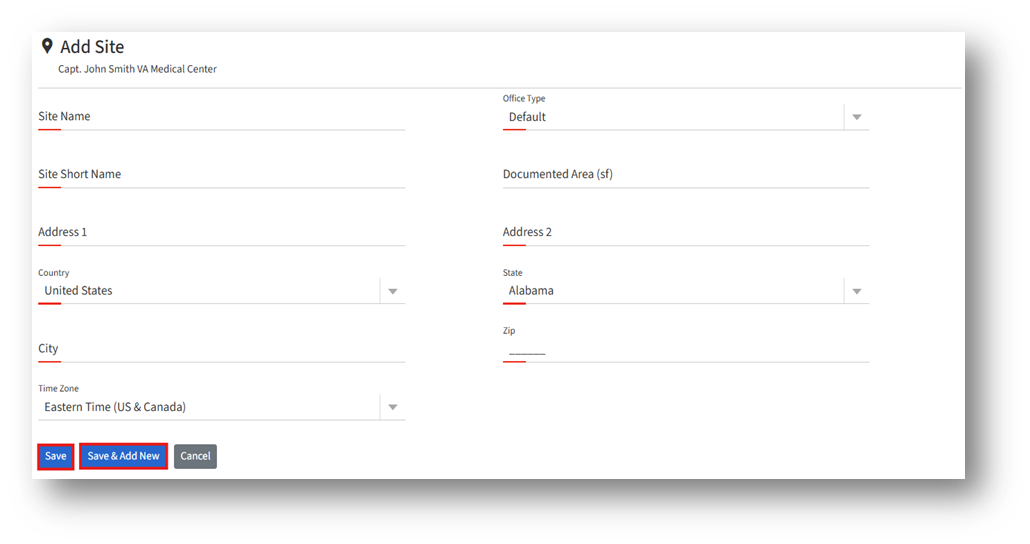
3. In the “Add Site/Workplace” page, the admin can enter the details in the above fields:
a. Office/Workplace/Site type* – Refers to the categorization of physical locations within an organization. (Example: Head Office, Branch Office)
4. After entering the details, click the “Save” button to create a new office/workplace/site.
5. Click the “Save & Add New” button to create the current workplace/site and clear the form to add another one.
6. Click the “Cancel” button to discard changes and return without saving.