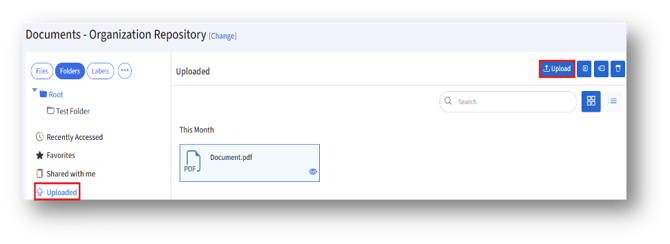
1. Under the Folders tab, the default folder where the file to be uploaded will appear.
2. To add a folder under the default folder/Root folder, select the Root folder and click the “+Folder” button.
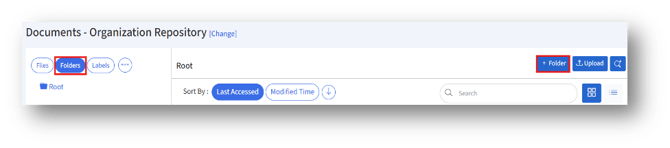
3. Clicking the “+Folder” button will open the “Add Folder” page.
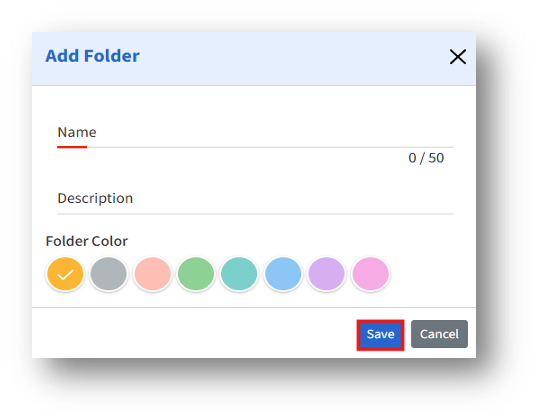
4. Enter the details, then click Save to save the newly created folder.
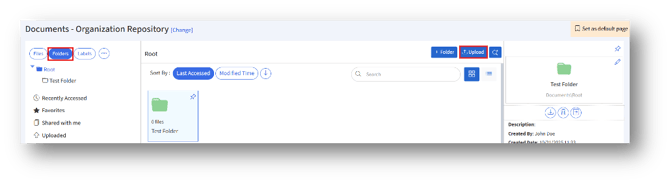
5. Once saved, folders can be pinned, edited, deleted, downloaded, or moved to another location.
6. To upload a file under the Root/created folder, select the folder and click the “Upload” button.
7. To upload multiple files/folder, click the “Uploaded” section and then the “Upload” button.