
You can cancel an upcoming or recurring seat reservation directly from the Calendar. Follow the steps below to cancel.
1. Select Your Reservation
Open the Calendar view and click the seat reservation you want to cancel.
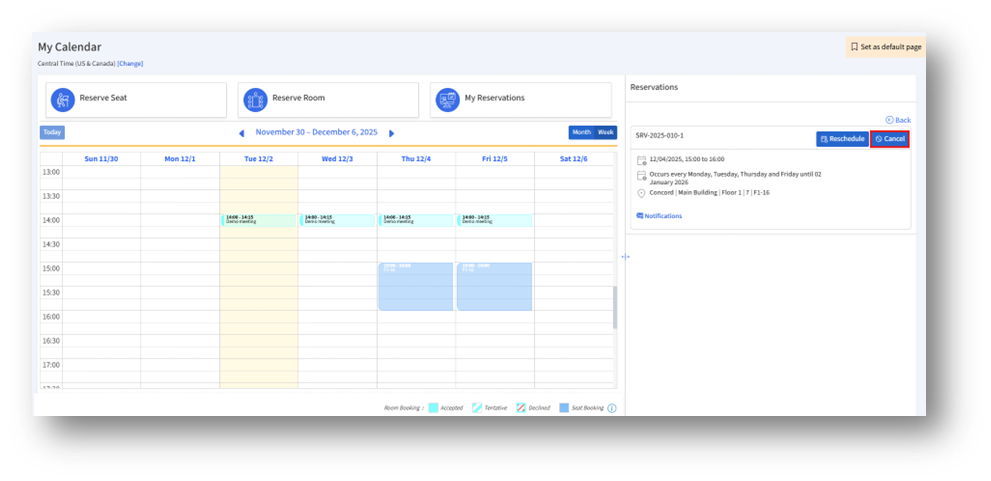
A details window will appear showing the reservation information.
2. Click the Cancel Button
Click Cancel to open the Cancel Reservation window.
3. Choose Cancellation Scope
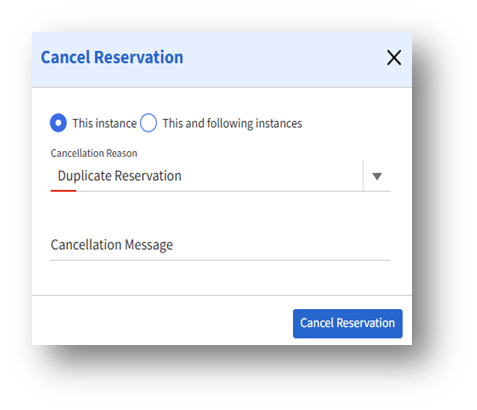
On the Cancel Reservation page, choose one of the following options:
1. This instance – Cancels only the selected reservation
2. This and following instances – Cancel the selected reservation and all upcoming recurring ones
4. Enter Cancellation Details
a. Cancellation Reason – Select a reason from the dropdown (e.g., Duplicate Reservation).
b. Cancellation Message (Optional) – Add a note explaining the cancellation if needed.
5. Confirm the Cancellation
Click Cancel Reservation to finalize and remove the booking.